v1.8 adds the dr module with eleven new scenarios and brings the Kafka CLI terminal to free play.
This release focuses on some of the harder Kafka architectures: stretched clusters, multi-region setups, failover, MirrorMaker 2, and disaster recovery. It also adds track 13, with nine scenarios driven directly from the terminal. That makes 20 new scenarios in total and brings the curriculum to 100 of 134.
What’s in v1.8
The cluster topologies themselves aren’t new. They’ve been appearing in free play since v1.3: first the active/passive and active/active mirrored pairs, followed by the 3-DC and 2.5-DC stretched clusters.
What was missing was the curriculum around them. v1.8 adds eleven scenarios that walk through how these architectures behave when things go wrong, why they fail in different ways, and what those failures mean in practice.
Stretched clusters (six scenarios). One Kafka cluster spread across multiple sites, where losing a DC is a replication problem rather than a regional failover:
- 2-DC - an
acks=allwrite exists in both sites, so it remains durable if either site is lost. - 3-DC and 2.5-DC - a 2-of-3 voter majority, or a witness site, keeps controller elections working after a DC failure. In the 2.5-DC setup, an observer in the surviving DC is automatically promoted into the ISR to restore
min.insync.replicas. - 2-DC without a witness - splitting an even number of voters removes quorum, so leader election stops until connectivity is restored.
- Losing the leader DC, and a split inside one DC - leadership moves to the surviving site; if a link inside a DC fails, the isolated replica drops out until the partition reaches its min.ISR floor.
Mirrored clusters (five scenarios). Two independent Kafka clusters connected with MirrorMaker 2, where losing a region means failing over to another cluster:
- Mirror lag and RPO - cut the replication link, let lag build up, fail over, and see exactly which records didn’t make it across.
- Active/active - each region owns its own region-specific topic and mirrors it to the other side.
- Offset translation - a consumer can’t simply reuse its original offsets after moving to another cluster. MM2 checkpoints translate them, with the consumer replaying the tail since the most recent checkpoint.
- Failback - bring the original primary back, re-sync it, and resume forward replication without losing data.
The Kafka CLI terminal emulator
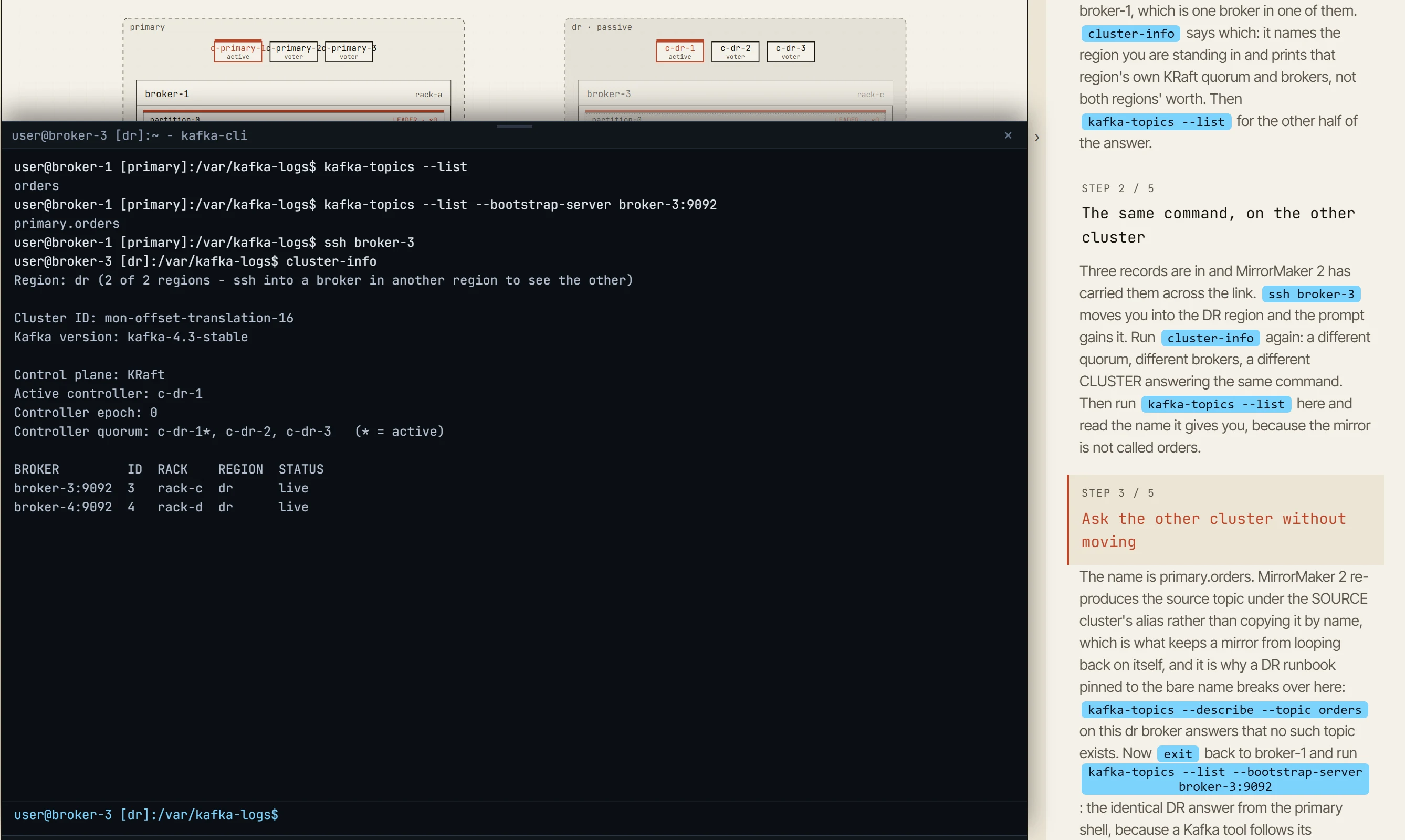
The other major part of v1.8 is a slide-up terminal drawer (Ctrl+`) that runs Kafka CLI commands against the simulated cluster.
There are sixteen tools: kafka-topics, kafka-consumer-groups, kafka-configs, kafka-log-dirs, kafka-reassign-partitions, kafka-leader-election, kafka-get-offsets, kafka-metadata-quorum, kafka-replica-verification, kafka-server-stop, kafka-server-start, kafka-console-producer, kafka-console-consumer, kafka-transactions, kafka-acls, plus cluster-info for inspecting the topology you’re currently connected to.
The commands use the same flags and familiar padded-column output as the real Kafka tools. Where the simulator implements only part of a command, its --help says so.

The host you’re logged into matters. The prompt shows the current host, ssh moves between hosts, and the terminal drawer includes a host menu. You can also Alt+click a broker on the canvas.
Commands operate against the cluster associated with that host. On a multi-region topology, for example, running kafka-topics --list from a DR broker shows the MirrorMaker 2 remote topic rather than the source topic. cluster-info shows that region’s quorum, not a combined view of both clusters.
You can also point --bootstrap-server at a broker in another region to query that cluster without leaving the current shell.
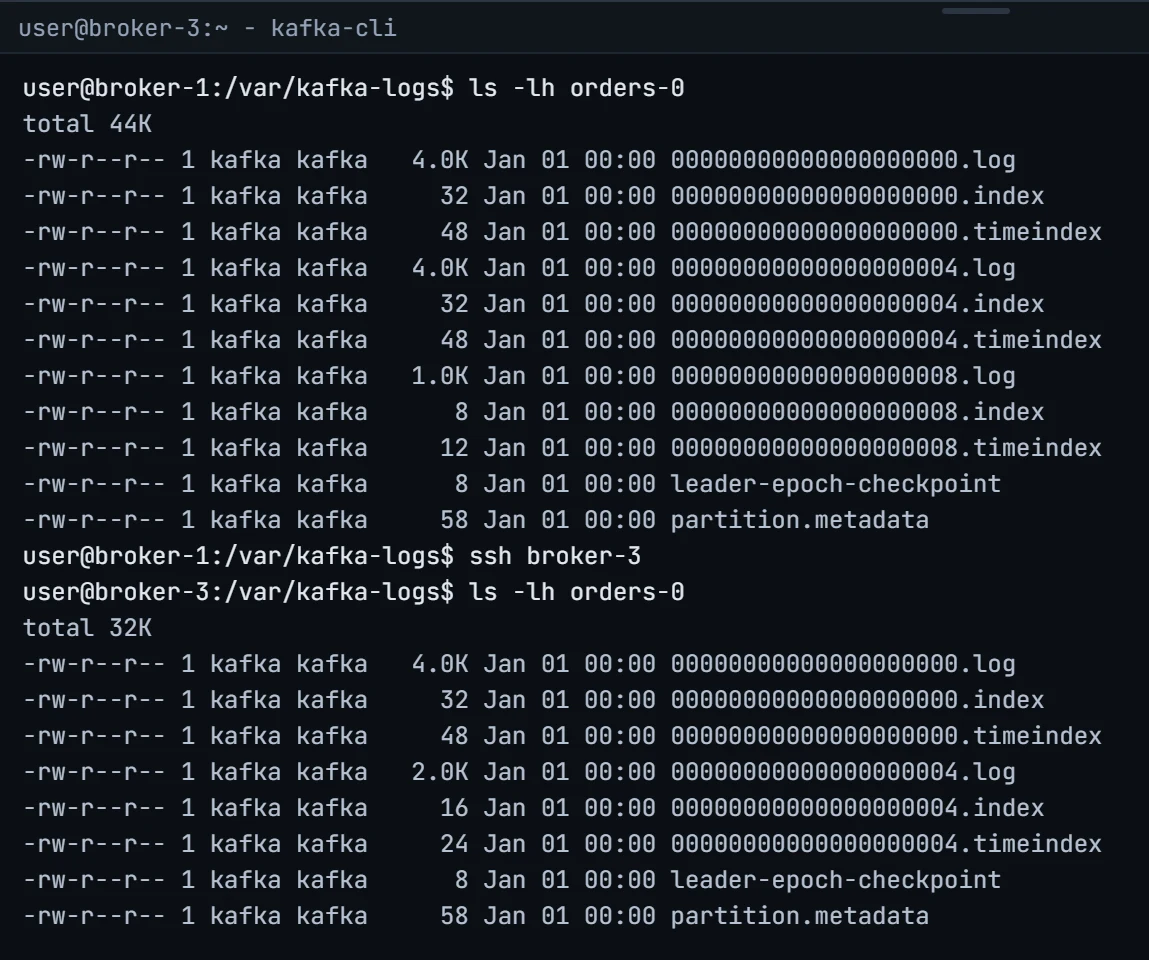
There’s also a filesystem view of the simulated Kafka log. ls, cd, tree, du, df, cat, and kafka-dump-log operate on the segments the simulator is actually maintaining for each broker.
Segment filenames use base offsets, retention removes whole segment files, and if a follower is throttled you can see its active segment falling behind the leader’s.
CLI reads reflect the frame currently visible in the simulator. If you pause the simulation or scrub back through the timeline, running --describe inspects that point in time.
CLI mutations behave like any other simulator action: they’re added to the action log, can be shared by URL, and can be replayed frame by frame.
The goal here is transfer.
On a real incident, it matters whether you can look at kafka-consumer-groups --describe and immediately know which column tells you what you need. A simulator that only gives you buttons can show the concept, but it can’t really teach that workflow.
Why DR comes this late
Disaster recovery pulls together almost everything introduced earlier: replication, consumer offsets, controller quorum, retention, and failure handling.
It makes more sense once those pieces are already familiar, which is why the DR module appears this late in the curriculum.
v1.9 will continue in the same area with observers and Cluster Linking.
Open the simulator, fail over a datacenter, then open the terminal and check the lag yourself.