monedula-metrics-reporter docs menu
Run the Grafana quickstart
Start Kafka, the reporter, an OpenTelemetry Collector, Prometheus and Grafana with Docker Compose and explore the bundled Kafka dashboards.
On this page
Build the reporter, run it on a three-broker cluster with an OpenTelemetry Collector, Prometheus and Grafana, and browse the seven bundled Kafka dashboards. A demo producer and consumer generate traffic and push their own KIP-714 metrics through the brokers.
What you need
- Docker with the Compose plugin.
- A JDK, version 17 or newer, to build the plugin JAR with the bundled Gradle wrapper.
- Git and a bash shell.
- Free local ports 3000, 4317, 4318, 8889, 9090, 9092, 9094 and 9096, which the stack publishes.
1. Get the source
Clone the repository at the v0.10.0 tag, the release these docs describe:
git clone --branch v0.10.0 https://github.com/monedula-dev/monedula-metrics-reporter.git
cd monedula-metrics-reporter
2. Build the plugin JAR
./gradlew shadowJarThe build copies the JAR, under the stable name monedula-metrics-reporter.jar, to build/quickstart-libs/, which the quickstart mounts into each broker.
3. Start the stack
cd quickstart
docker compose up -d
Give the containers about 45 seconds to come up. The stack runs:
- Three Kafka brokers,
kafka1,kafka2andkafka3, on Apache Kafka 4.2.0 in KRaft mode with combined broker and controller roles. Your host reaches them aslocalhost:9092,localhost:9094andlocalhost:9096. - An OpenTelemetry Collector that receives OTLP on ports 4317 (gRPC) and 4318 (HTTP) and serves the metrics on port 8889 for Prometheus.
- Prometheus, which scrapes the collector every 15 seconds.
- Grafana, with Prometheus as its data source and the dashboards provisioned.
- A demo client, which creates a KIP-714 client-metrics subscription and runs a continuous producer and consumer against the topic
quickstart-demo.
Every broker loads the reporter from the mounted JAR. In docker-compose.yml the reporter is configured through environment variables, the same keys you would put in server.properties:
      KAFKA_METRIC_REPORTERS: dev.monedula.metricsreporter.OtlpMetricReporter
      KAFKA_OTLP_METRIC_REPORTER_ENDPOINT: http://otel-collector:4317
      KAFKA_OTLP_METRIC_REPORTER_TRANSPORT: grpc
      KAFKA_OTLP_METRIC_REPORTER_INTERVAL_MS: 15000
The reporter exports every 15 seconds here, instead of the default 30. The first export runs one interval after a broker starts, so the dashboards fill in within a minute or so.
4. Open the overview dashboard
Open http://localhost:3000. Anonymous access is on, so there is no login. Seven dashboards are provisioned in the Kafka folder:
| Dashboard | UID | Use it for |
|---|---|---|
| Kafka OTLP Metrics | kafka-otlp |
Overview: cluster health, throughput, latency, JVM, per-topic drill-down |
| Kafka Production | kafka-otlp-production |
Producer side: ingest throughput, Produce latency, failed Produce requests |
| Kafka Consumption | kafka-otlp-consumption |
Consumer side: outbound throughput, Fetch latency, replica-fetcher lag |
| Kafka Topic Details | kafka-otlp-topic-details |
One topic: throughput, per-partition log end offset, leaders, ISR |
| Kafka JVM Health | kafka-otlp-jvm |
JVM runtime: heap, GC, threads, class loading, CPU |
| Kafka Producers (client) | kafka-otlp-client-producers |
KIP-714 client push: producer throughput, record error rate, batch metrics |
| Kafka Consumers (client) | kafka-otlp-client-consumers |
KIP-714 client push: fetch throughput, commit rate, assignment churn |
Each dashboard is also at http://localhost:3000/d/<UID>. Open Kafka OTLP Metrics, at http://localhost:3000/d/kafka-otlp. Its six rows, top-down:
- Cluster Health: active controller count, offline partitions, broker-wide and per-topic under-replicated partitions, active brokers, ISR shrinks and expands.
- Throughput: bytes in and out per broker and per topic, messages in per second.
- Request Latency & Saturation: p99 request time by API, Produce request time at p50, p95 and p99, request handler and network processor idle percentage, request queue size.
- JVM: heap memory, GC duration, threads, loaded classes, CPU utilization.
- Per-Topic Drill-down: topic bytes in and out, topic messages in, under-replicated partitions and log end offset per partition.
- Reporter Health: the reporter’s export success rate, export failure rate and last-tick duration.
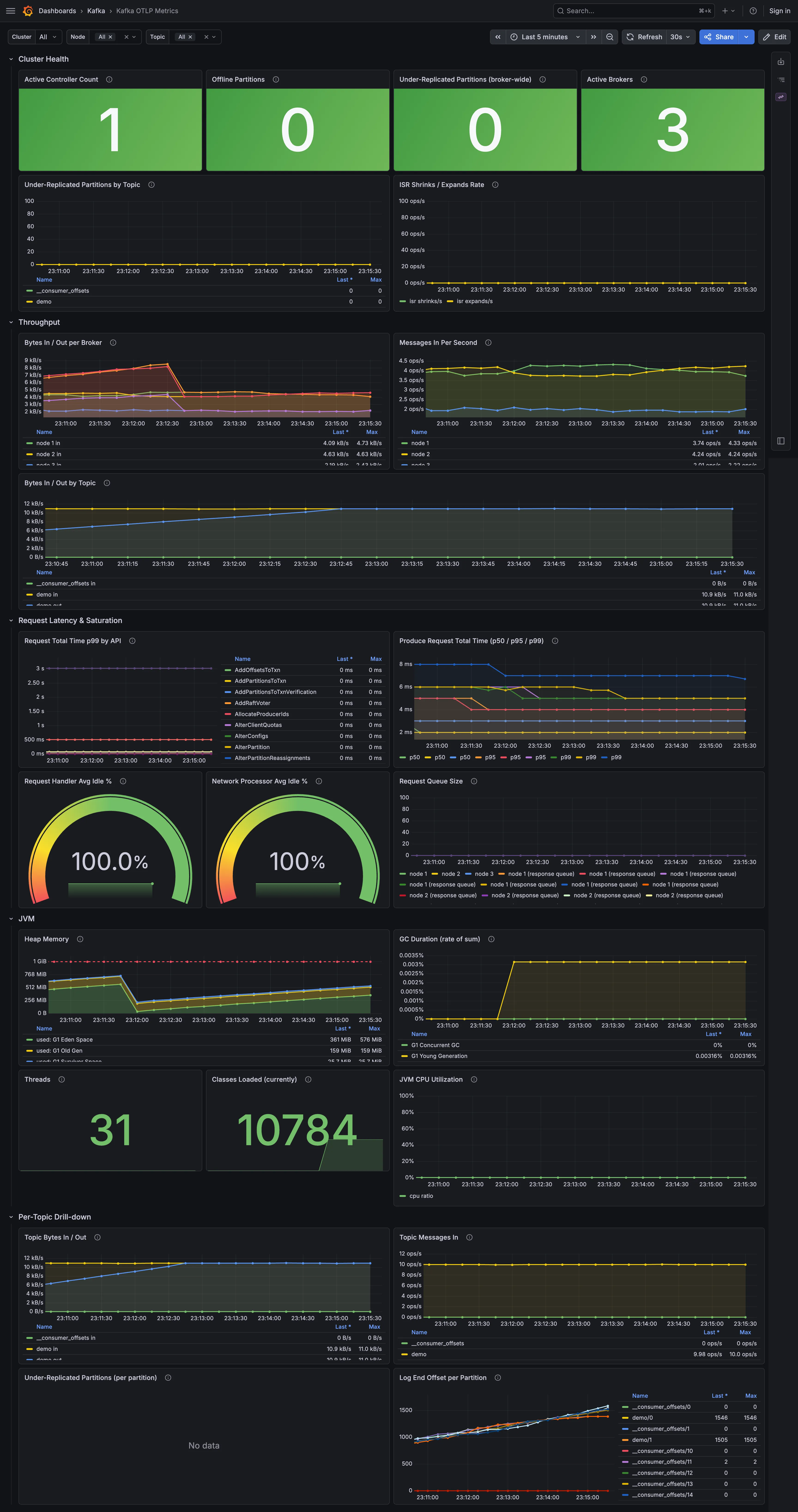
The $cluster_id, $node_id and $topic variables at the top of the page filter every panel at once, to scope the overview to one cluster, broker or topic.
5. Drill down
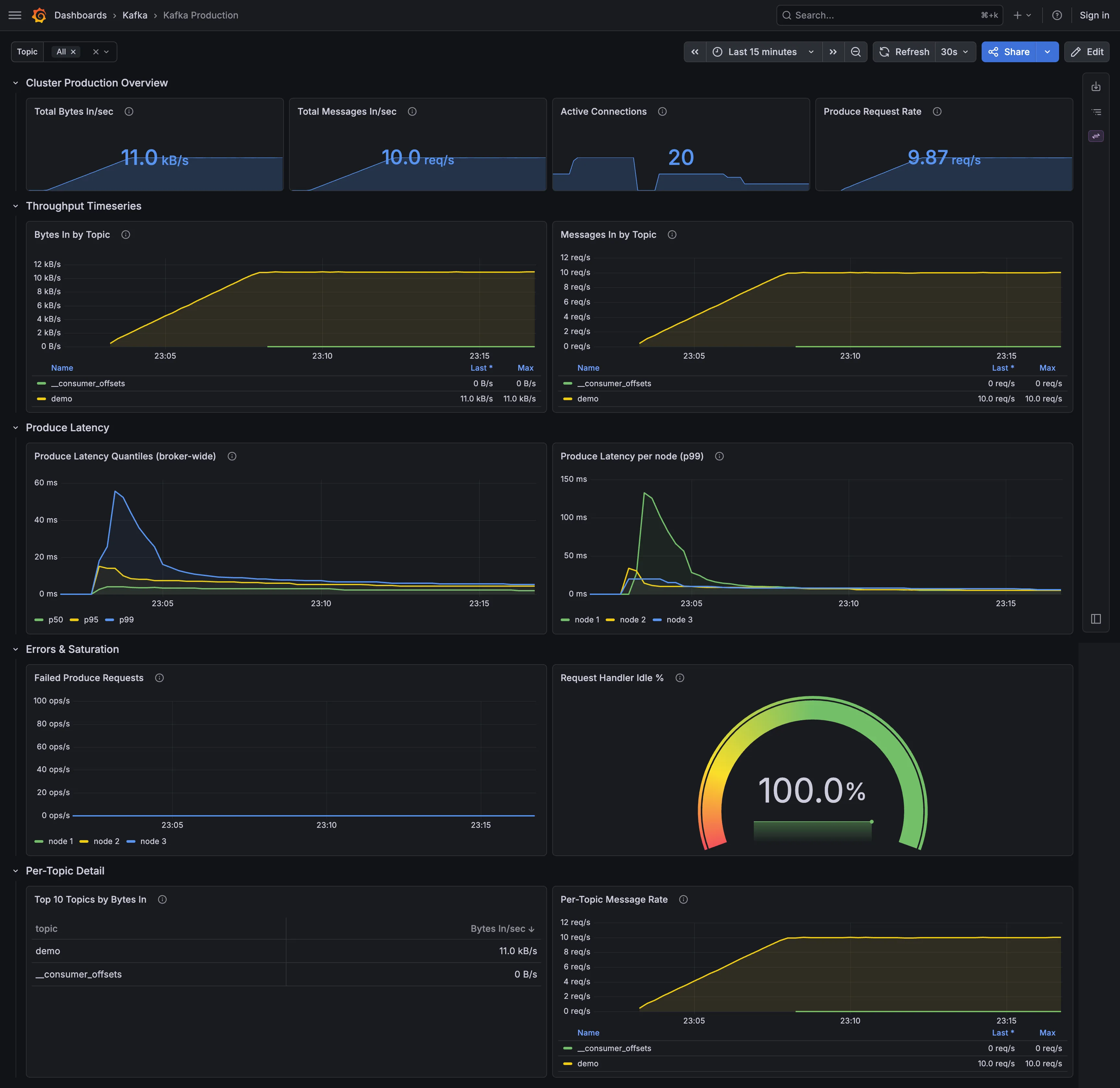
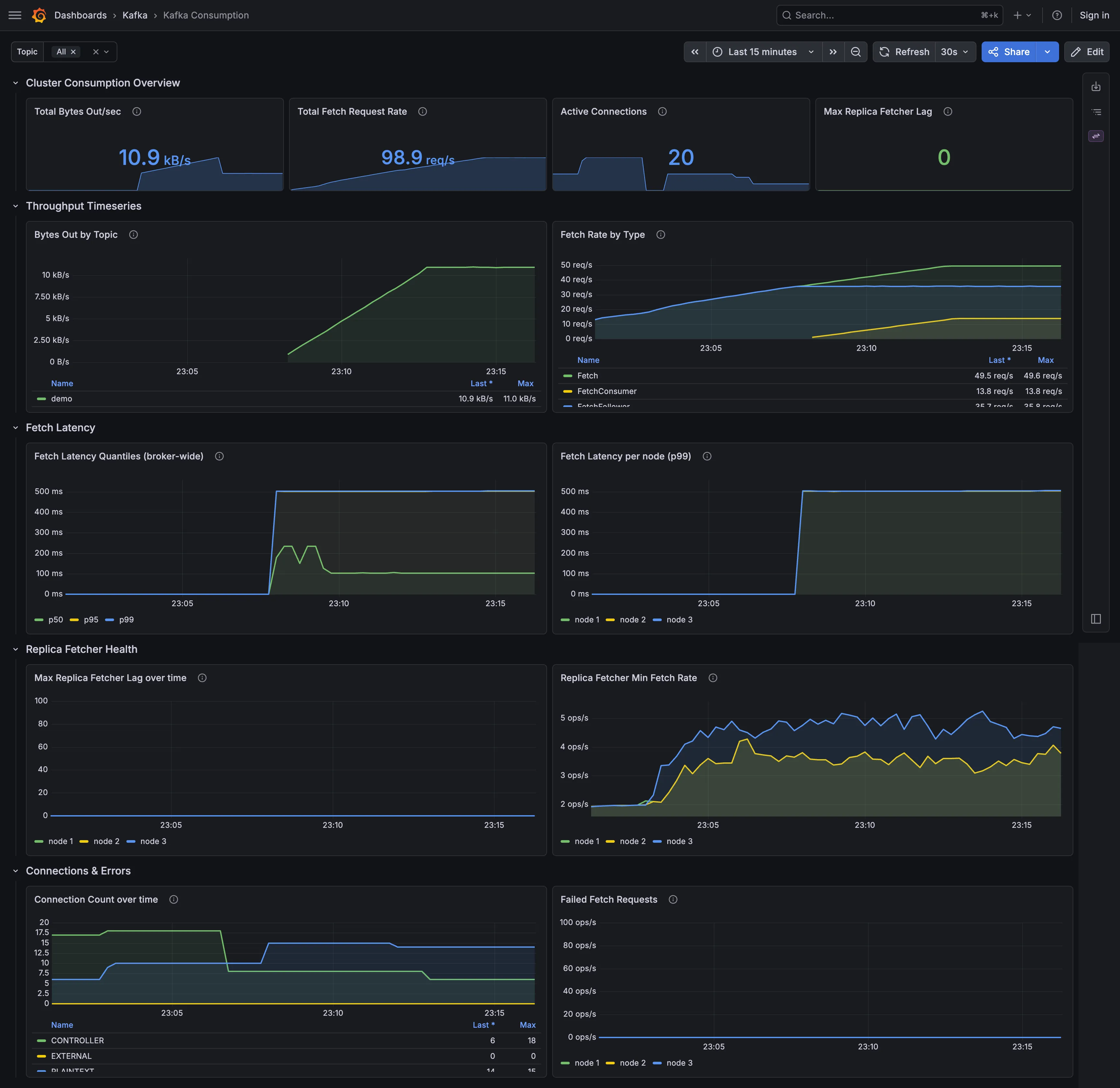
Kafka Production and Kafka Consumption are the incident views for the two request paths. Beyond the table above, Production shows request-handler saturation and the top topics by bytes in, and Consumption shows connection counts and failed Fetch requests.
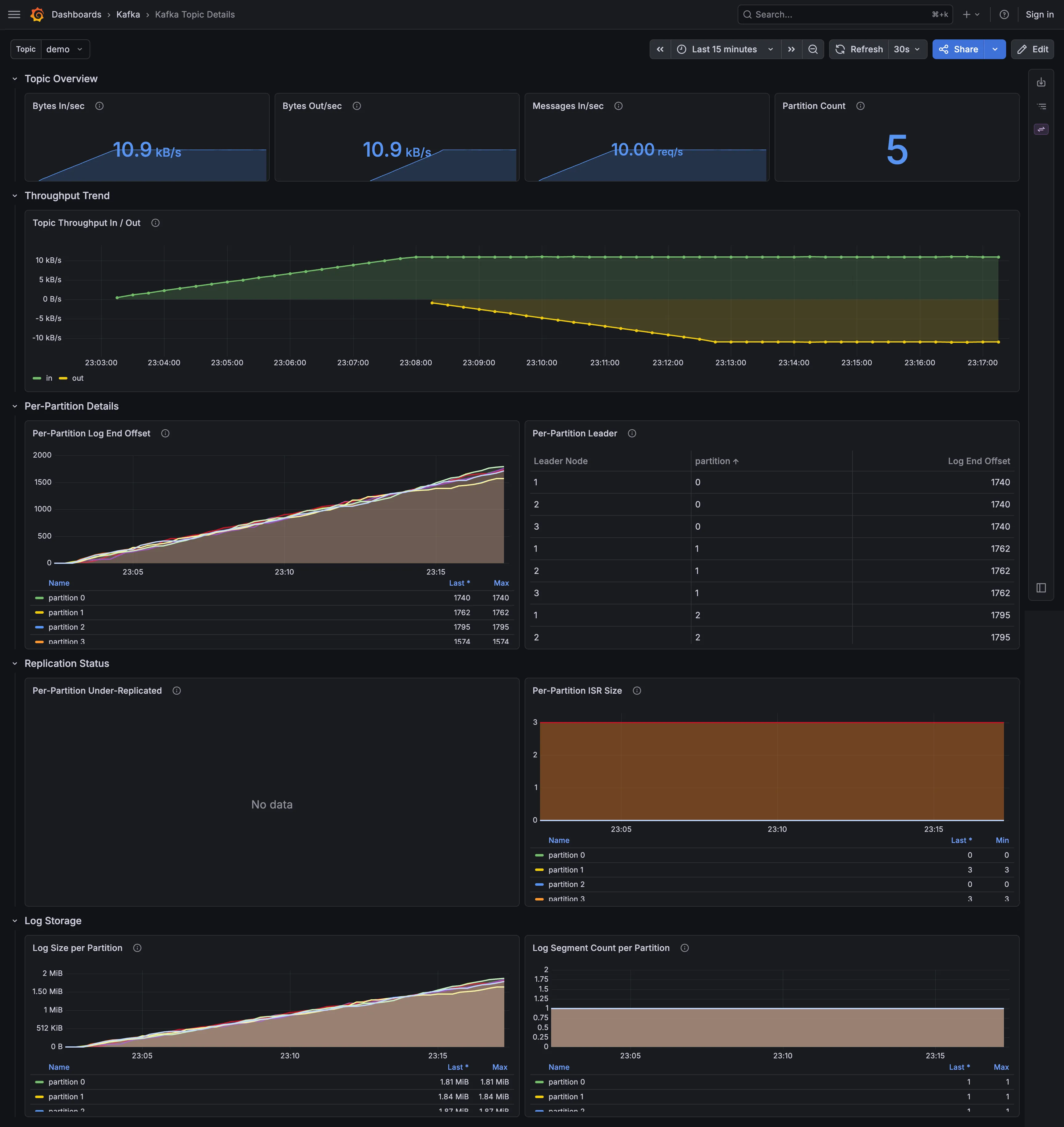
In Kafka Topic Details, pick quickstart-demo from the $topic variable. Beyond the table’s columns, it shows under-replication, size on disk and segment count.
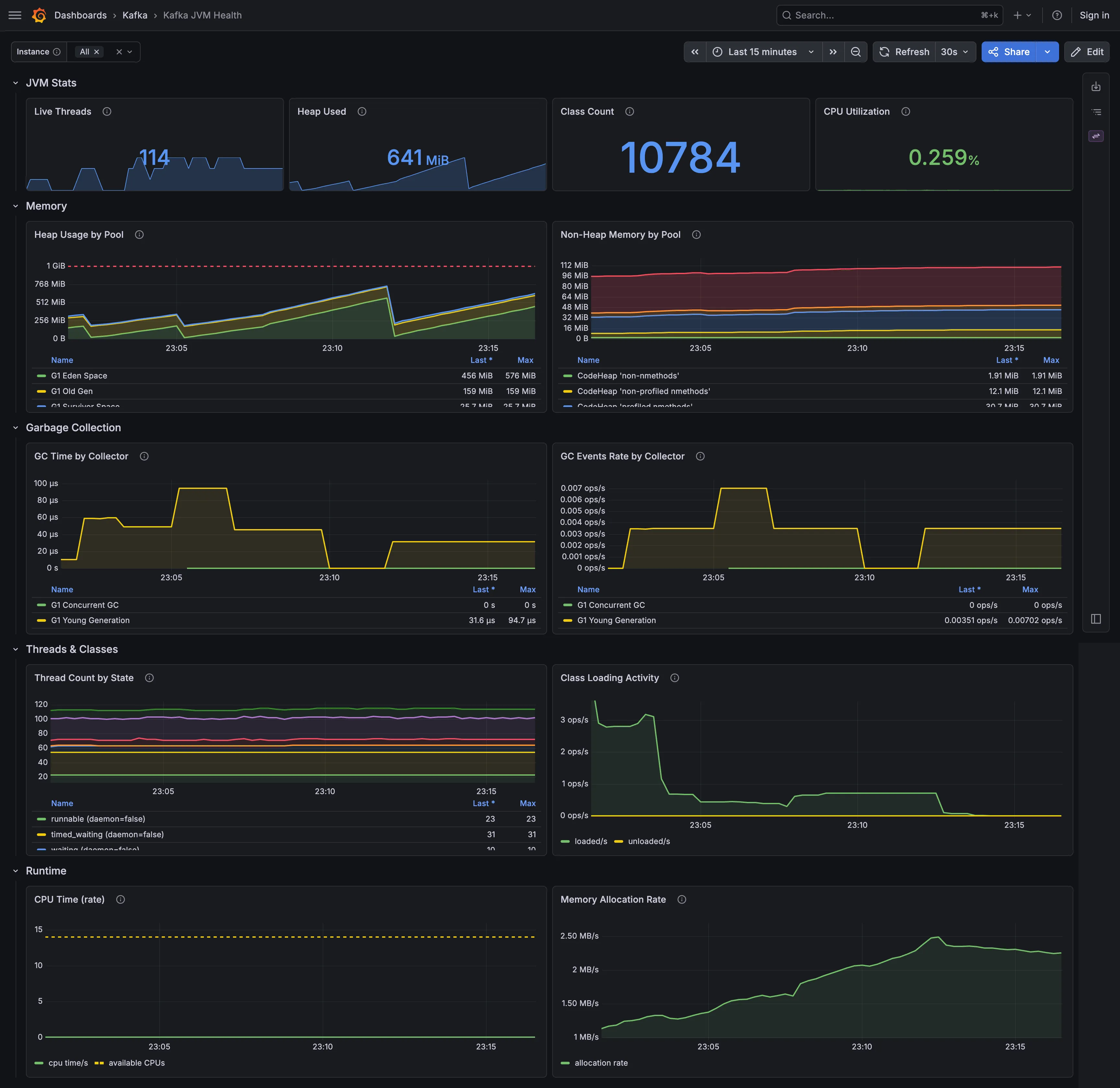
Kafka JVM Health shows the brokers’ heap, GC, threads, class loading, CPU and allocation rate, with the same broker labels as the Kafka metrics.
6. See the client metrics
The demo service created a client-metrics subscription called quickstart-clients, for all metrics with a 5-second push interval. Its producer and consumer push their own telemetry to the brokers, and the reporter forwards it to the collector. Open Kafka Producers (client) and Kafka Consumers (client).
Their panels come in two rows:
- Standard panels use the metrics that every KIP-714 client emits: request, fetch, rebalance, commit and per-node latency, produce throttling, record queue time, poll idle ratio, assigned partitions and connection creation.
- Extended panels use metrics that only the Java client pushes, such as throughput rates, consumer lag and lead, and batching and buffer metrics. They stay empty for librdkafka-based clients, which push only the standard metrics.
The reporter labels client metrics with the pushing client’s client_id, so the Client variable at the top filters the dashboards per client. The Java demo clients are perf-producer-client and console-consumer.
To compare a librdkafka-based client, start the quickstart’s librdkafka Compose profile. It runs a confluent-kafka-python producer and consumer against the topic quickstart-librdkafka-demo, next to the Java demo:
docker compose --profile librdkafka up -d demo-librdkafkaThe profile’s init container creates the quickstart-clients subscription again, so the profile works with or without the Java demo. It also works after the brokers are recreated: the quickstart mounts only the reporter JAR into them and does not persist their cluster metadata, so the subscription is gone. Allow about a minute for its clients to start and fetch the subscription, then pick librdkafka-demo-producer or librdkafka-demo-consumer in the Client variable: the Standard panels fill, and the Extended panels stay empty.
To turn the client telemetry off, delete the subscription; the demo clients keep producing and consuming:
docker exec quickstart-kafka1-1 /opt/kafka/bin/kafka-client-metrics.sh \
  --bootstrap-server kafka1:9092 --delete --name quickstart-clients
docker compose stop demo instead stops the Java demo clients together with their traffic. The demo service creates the subscription again whenever it starts.
7. Query Prometheus
Prometheus runs at http://localhost:9090, where you can write your own PromQL. Ask it for the type of the active-controller metric:
curl localhost:9090/api/v1/metadata?metric=kafka_controller_kafkacontroller_activecontrollercountThe response reports "type":"gauge": Prometheus scrapes the collector’s /metrics endpoint, which keeps the type metadata (Compatibility covers remote write).
In the Prometheus UI, query monedula_reporter_export_success_total. It is one of the reporter’s self-monitoring metrics, and it grows by one with every successful export of each broker.
8. Clean up
Stop and remove the stack:
docker compose downIf you started the librdkafka profile, run docker compose --profile librdkafka down instead, so its containers go too.
Next steps
- Install the reporter on brokers puts the released JAR on your own cluster.
- Collect Kafka client metrics with KIP-714 sets up the subscription and the client labels.
- Alert on broker health loads the example alert rules that ship with the quickstart.