Kafka Simulator docs menu
Build a cluster in free play and break it
Start a free-play sandbox, produce and consume records, kill brokers until writes fail, read the Why and Metrics tabs, then share the cluster as a link.
On this page
The steps assume you know the panels from Run your first scenario.
1. Start a sandbox
Open the playground with no link parameters. It opens in free play, the sandbox mode. Free play, at the top of the left rail, starts a fresh sandbox at any time. Leave the cluster type picker on Single DC. Opening it shows every type with a small drawing of its sites and brokers, and a line on what it builds.
The sandbox starts with:
- three brokers,
broker-1tobroker-3, in the racksrack-atorack-c; - a topic,
orders, with three partitions, replication factor 3 andmin.insync.replicas2; - a producer,
p1, withacks=alland idempotence on; - a consumer group,
cg1, with one consumer,c1.
Records already flow. The auto-loop option in the canvas toolbar is on, so the producer keeps writing at the interval in interval.ms, and the timeline’s playhead is playing. Each thing that happens adds a frame to the timeline. A sandbox has no authored steps, so the Steps tab only says that your own actions build the timeline.
2. Look at the topic
Select the cluster, the frame around the brokers. The Inspector opens on Cluster · kafka, with four tabs: Shape, Topics, Engine and Access. Under each tab’s name, a short line says what is set there now. The Topics tab shows orders: partitions, replication factor, min.insync.replicas, cleanup.policy, retention and remote storage. Add topic adds another, and Copy as kafka-topics.sh copies the commands that would create the same topics on a real cluster.
Leave the numbers as they are. Partitions, the replication factor, and adding, deleting or renaming a topic start a fresh, blank cluster, so those edits wait in a plan at the bottom of the Inspector. The plan lists each change and how many records applying would drop. Apply runs it and Discard drops it. Every other edit applies at once and keeps your records.
The Shape tab holds brokers & racks · free play. It reads the cluster as one line, “3 brokers on 3 racks”, with a card per rack: its brokers, its share of the replicas, and what losing it would cost. + on a rack adds a broker there. That keeps your records and history, and the new broker starts empty: no partition moves onto it until you select Rebalance. − drains a broker before it removes it, as you would decommission a real one.
3. Produce and consume
Select the producer p1 on the canvas. The Inspector shows its settings, among them acks, idempotence, retries, linger.ms, compression.type and the partitioner. Select produce as p1 to write one record by hand. The timeline gains a frame, labelled “p1 → orders”.
Then select the consumer group, cg1. The Inspector lists its members and, for each partition, the consumer’s position, the committed offset, the high watermark (HW) and the lag. While records flow, the positions and the HW advance.
Select the Metrics tab. Records produced and Consumer lag show the traffic so far, and ISR health reads as healthy.
4. Kill a broker
Select broker-1, then kill · hard broker-1. The Inspector marks the broker DEAD, and the timeline records the failure. The partitions that broker-1 led elect a new leader on another broker, and the producer keeps writing.
Open the Why tab. The band at its top says how bad things are, and the checks under it count the brokers up and the partitions in sync. Below them is every problem, worst first, the worst one open: “1 broker down”, with the Kafka name BROKER_DOWN, the broker’s id, and a suggestion: restart the downed broker. In Metrics, Under-replicated partitions goes up.
5. Kill a second broker
Select broker-2, then kill · hard broker-2. Every partition of orders has a replica on every broker, so every partition is now down to a single in-sync replica, below min.insync.replicas.
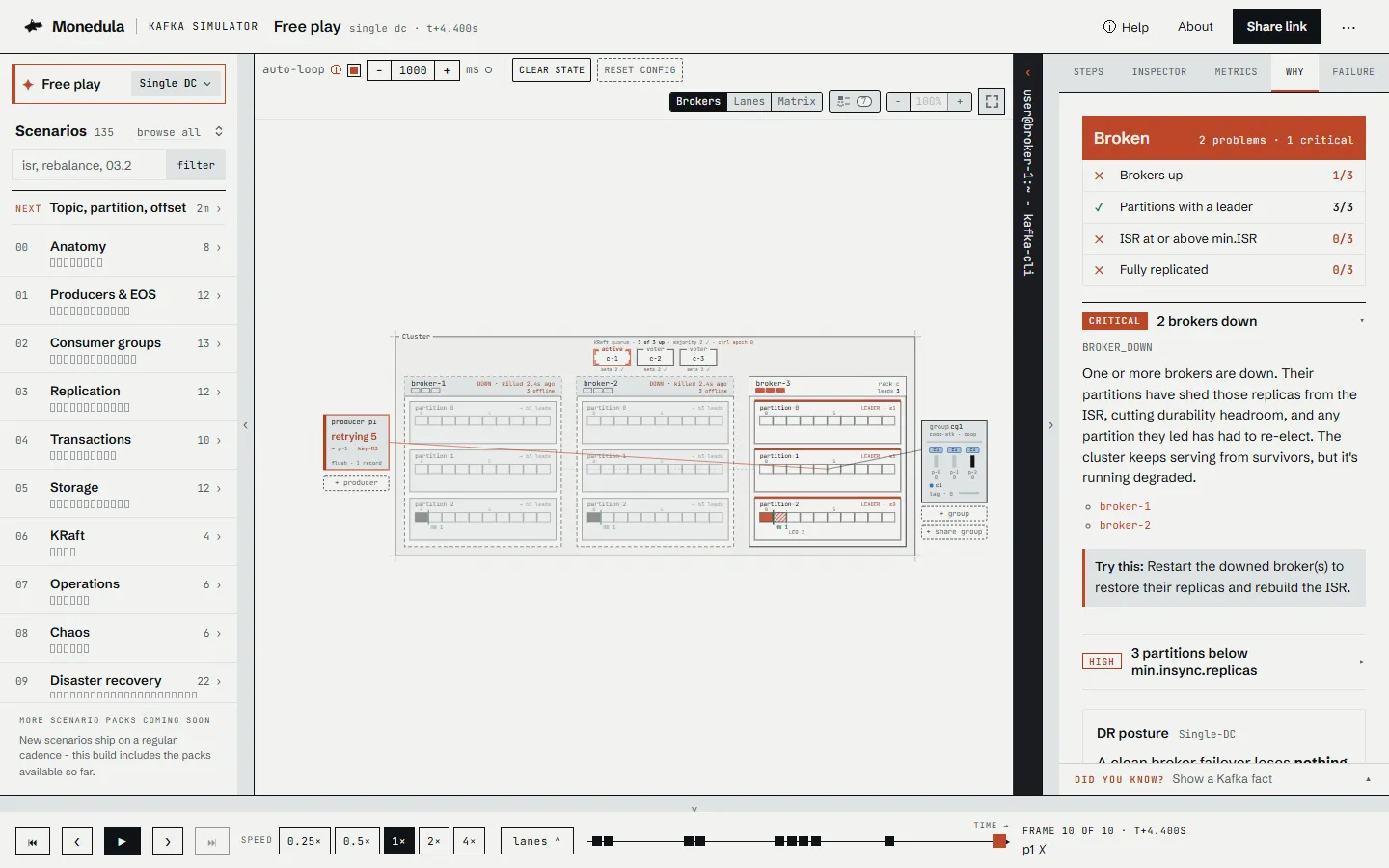
The producer’s acks=all writes are now refused, and the producer retries them. Open Why: it now lists more than one problem. Select the one about min.insync.replicas: it names the error NOT_ENOUGH_REPLICAS and lists the partitions with their ISR size next to the minimum, for example “orders/0: ISR 1 < min.ISR 2”. Once the producer has given up on a write, that problem also explains the failed write, as in the first tutorial.
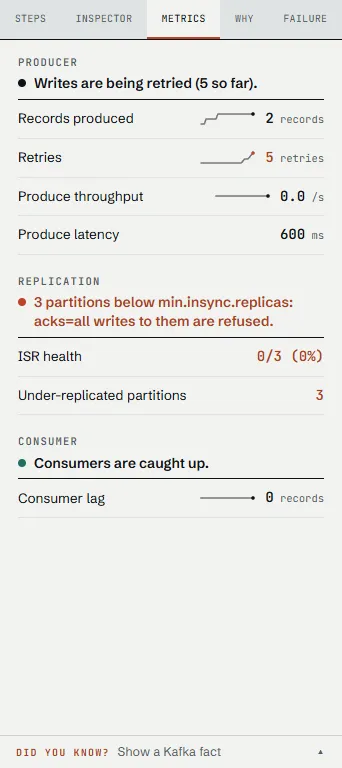
In Metrics, ISR health shows the partitions below min.insync.replicas, Under-replicated partitions shows all three, and Retries, further up the tab, counts the producer’s attempts.
6. Bring the cluster back
Select broker-2, then restart broker-2, and do the same for broker-1. On a dead broker the kill button is replaced by a restart button. The brokers rejoin and their replicas catch up, and ISR health goes back to 3/3. If the producer is still retrying, its next attempt succeeds and Why goes back to “Cluster is healthy.”
If the outage outlasts the producer’s retries and retry.backoff.ms, set in its Inspector, the producer gives up, and Why explains the producer’s own failure instead. With idempotence on, that can be OutOfOrderSequenceException, with the suggestion to restart the producer. Clear state, above the canvas, wipes the records, actions and history and keeps the cluster configuration, so you can run the experiment again with shorter or longer outages.
To look back, use the timeline as in the first tutorial; in a sandbox, ⏮ moves the playhead to the first frame without clearing anything.
7. Share it
Select Share link in the top bar. It copies a link to this exact view to your clipboard, and the button confirms it. Paste the link into a new tab. The playground opens the same cluster and replays your actions: the address carries scenario=free and an actions list, one entry per thing you did.
The link holds your actions up to the frame you are looking at, so move the playhead to the moment you want to share first. Share a session as a link lists what else it carries.
The format of these links is public. The playground URL format describes every parameter, and the monedula-sim-link tool builds the same links from a real cluster.
Where to go next
- The scenario catalog lists the scenarios that cover replication, producers, consumer groups and more, each with a link that opens it in the playground.
- Features by release says which free-play topologies and tools this release offers.
- NotEnoughReplicasException explains the writes refused in step 5, and Partitions are offline with no leader what happens when no in-sync replica is left to lead a partition.
- OutOfOrderSequenceException explains the error an idempotent producer can give up with in step 6.
- Kafka partitions are under-replicated explains the Under-replicated partitions metric of steps 4 and 5.